Old libraries
Get your photos out of an old library
An old iPhoto or Aperture library hides your photos in folders only that program understood. Photo Clinic reads its records and brings your photos out with their albums, keywords and ratings. It also copes when the drive is failing.
Download for Mac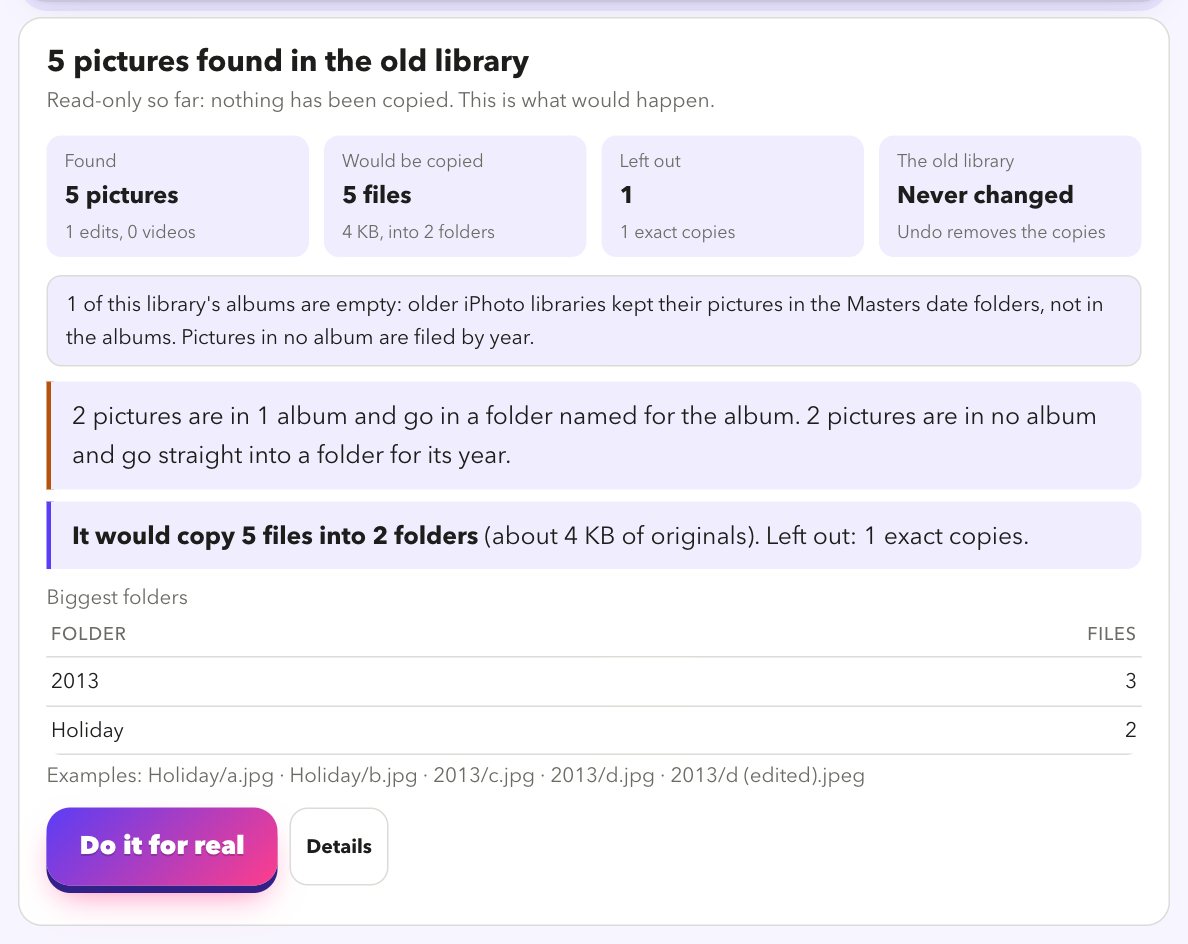
Just add it to Move my photos
Add the old library under File Sources / Locations. Move says This is an old library, reads its database, and offers the same choices as for any folder: arrange by album, year, month or day, skip duplicates, copy gently. Preview first, then Do it for real.
- Reads iPhoto, Aperture and older Photos libraries, including
.migratedphotolibrary, and tells you which kind it found. - Copies your original pictures into folders named for your albums and events, or by year, or by month.
- Writes keywords, ratings, titles, captions, dates and places into the copies. For Photos libraries the edited versions are kept beside the originals; for iPhoto and Aperture libraries only the originals are read for now.
- Skips what is trashed or missing, and skips exact duplicates inside the library.
- Preview first: it shows the folders it would make and how many files, before it copies anything.
- Running it again picks up where it stopped: files already copied are skipped.
When the drive is failing
A drive that has started to fail can get stuck on a single file and never finish. We learned to plan for it.
- Skips stuck files. If the drive does not answer for 90 seconds, the files it stuck on are listed as skipped and the copy carries on.
- Tries them last next time. A rerun tries those files at the end, for a short time each, so they cannot hold up the others.
- Keep trying. One button after a copy retries just the files that failed.
- Copy gently. A slower copy that rests after every file, for a drive, cable or hub that is struggling.
- Find damaged files spots photos and videos that are cut short, empty or will not open, and can copy only the good ones.
- A saved list names every file that could not be copied, and why.
When you have copied it all
The old library is not changed by a copy. When you are happy, you can clear the originals you have safely copied, so only what is left to do remains.
- Clear the copied originals first shows how many are safely copied and how big they are, and moves nothing.
- It only touches an original whose copy is in your folder and about the same size. Files the drive stuck on are left alone.
- Choose Move to the Trash (you can put them back) or Delete for good (you type DELETE).
- If the drive stops answering part-way, it stops, and nothing is lost.
- Compare two places can double-check the copy against the library first.
Look at your library for free
Download it, point it at your photos, and read the preview. That costs nothing and changes nothing.
Download for MacFree · Apple silicon Macs · signed and checked by Apple